Multiple domain connectivity
Large-scale urban flood modeling projects often require millions of computational cells, especially when working with detailed topography and infrastructure. Once a project exceeds approximately 6 million cells, performance and workflow bottlenecks can become significant.
A multiple domain setup allows engineers to break the full project area into smaller, connected subdomains. This offers several advantages:
Parallel Workflows: While one domain is running a simulation, other domains can be actively developed or reviewed.
Improved Efficiency: Smaller subsets of data are faster to schematize, troubleshoot, and re-run.
Simplified Review: Reviewers and collaborators can focus on a specific subdomain without loading the entire model.
Scalable Modeling: Each subdomain acts as a building block, making it easier to construct complex, full-urban “living models” over time.
By using a modular approach, engineers can speed up development, improve model maintainability, and support collaborative workflows in large urban floodplain studies.
Open the connectivity window.
Click the Connectivity button to open the multiple-domain connectivity dialog.
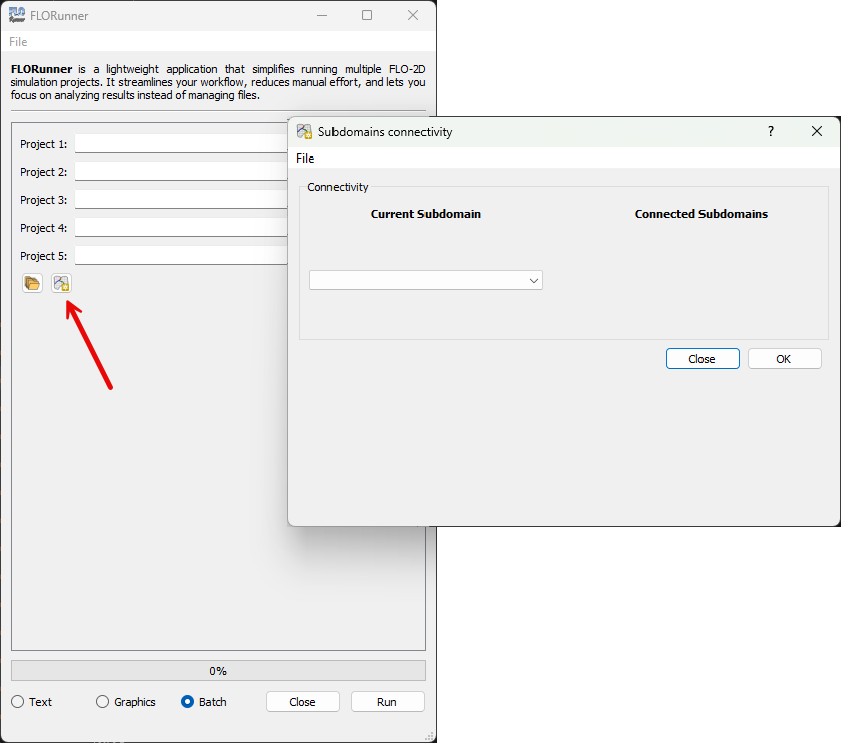
Define domain connectivity.
In the connectivity window, all detected domains in the project are listed. Assign upstream and downstream relationships as needed, then click OK to confirm.
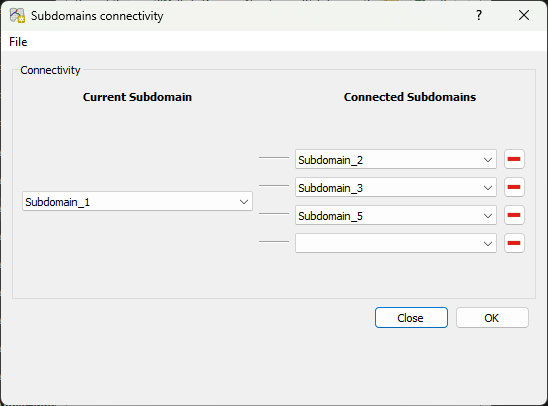
Save and apply connectivity.
After clicking OK, the connectivity information is saved to a temporary file. When the projects are executed, FLORunner reads this file and routes discharge from upstream domains to their corresponding downstream domains according to the defined connectivity.