FLO-2D Pro Documentation Logo

Contents:

  • FLO-2D Installation and Setup
  • FLO-2D Pro Resource Center
  • FLO-2D Gila for QGIS Documentation
    • FLO-2D Gila for QGIS User Manual
      • Plugin Features
      • Toolbar
        • FLO-2D Project
        • FLO-2D Import Export
        • Run FLO-2D Pro
        • FLO-2D Parameters
        • FLO-2D Info Tools
        • FLO-2D Project Review
        • Help
      • Widgets
      • Grid Modification
    • FLO-2D Gila for QGIS Technical Reference
  • FLO-2D MapCrafter
  • FLO-2D FLORunner
  • FLO-2D Gila Tutorials
FLO-2D Pro Documentation
  • FLO-2D Gila for QGIS Documentation
  • FLO-2D Gila for QGIS User Manual
  • Toolbar
  • FLO-2D Import Export
  • View page source

FLO-2D Import Export

The FLO-2D Import Export button facilitates the import of FLO-2D data, including *.DAT files, *.HDF5 files, and HEC-RAS channel data. It also serves as the tool for exporting FLO-2D data, providing options to export all components, selected components, or to the *.HDF5 file.
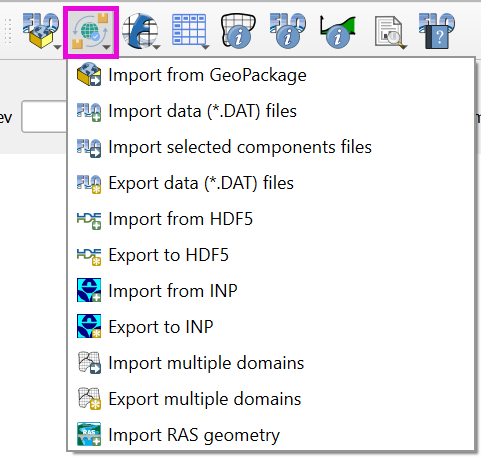
../../../../_images/importexport001.png

Contents

  • Import from Geopackage
  • Import data (*.DAT) files
    • Import the FLO-2D *.DAT files into the Project
  • Import Selected Component Files
    • Import Selected Component Files
    • Several Components
    • One Single Component
  • Export data (*.DAT) files
    • Export FLO-2D *.DAT Files
    • Troubleshooting
  • Import from HDF5
    • Import FLO-2D data from HDF5 file
  • Export to HDF5
    • Export the FLO-2D files into a HDF5 file
    • HDF5 Data Structure
  • Import SWMM.INP
  • Export to SWMM.INP
  • Import Multiple Domains
  • Export Multiple Domains
    • Method 1 - Export using MULTDOMAIN.DAT
    • Method 2 - Export using ONLY MULTDOMAIN.DAT
    • Method 3 - Export using CADPTS.DAT
    • Method 4 - Export using ONLY CADPTS.DAT
    • Method 5 - Export using No Connectivity
  • Import HEC-RAS Channel
    • Import HEC-RAS Channel
Previous Next

© Copyright 2004 - Present, FLO-2D Software, Inc..

Built with Sphinx using a theme provided by Read the Docs.
Version: Build25
Versions
Build25
Build23
Build21