FLO-2D Pro Documentation Logo

Contents:

  • FLO-2D Installation and Setup
  • FLO-2D Pro Resource Center
  • FLO-2D Gila for QGIS Documentation
    • FLO-2D Gila for QGIS User Manual
      • Plugin Features
      • Toolbar
        • FLO-2D Project
        • FLO-2D Import Export
        • Run FLO-2D Pro
        • FLO-2D Parameters
        • FLO-2D Info Tools
        • FLO-2D Project Review
        • Help
      • Widgets
      • Grid Modification
    • FLO-2D Gila for QGIS Technical Reference
  • FLO-2D MapCrafter
  • FLO-2D FLORunner
  • FLO-2D Gila Tutorials
FLO-2D Pro Documentation
  • FLO-2D Gila for QGIS Documentation
  • FLO-2D Gila for QGIS User Manual
  • Toolbar
  • FLO-2D Project
  • View page source

FLO-2D Project

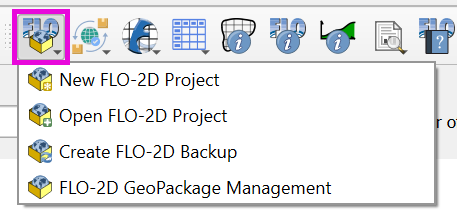
The FLO-2D project button serves to initiate a new project, open an existing one, and utilize the GeoPackage Management tool for external layer management within the user’s GeoPackage.
../../../../_images/open000.png

Contents

  • New FLO-2D Project
    • Create a new FLO-2D Project
  • Open FLO-2D Project
    • Open an existing FLO-2D GeoPackage
    • Update an outdated FLO-2D GeoPackage
  • Save FLO-2D Project
    • Save a new FLO-2D Project
    • Saving external layers into the geopackage
    • QGZ System
    • Removing Layers
  • Create FLO-2D Backup
    • Create Backup
  • FLO-2D GeoPackage Management
    • GeoPackage Management
    • GeoPackage Structure
Previous Next

© Copyright 2004 - Present, FLO-2D Software, Inc..

Built with Sphinx using a theme provided by Read the Docs.
Version: Build25
Versions
Build25
Build23
Build21